Appendix B: Protocols, Ports and the API
Output and input protocols
| Protocol | Transport | Typical use | In/Out |
|---|---|---|---|
| E1.31 (sACN) | UDP multicast/unicast | Ethernet pixel/DMX controllers | Out & In |
| DDP | UDP unicast | Efficient Ethernet pixel control (e.g. Falcon, WLED) | Out & In |
| ArtNet | UDP | Stage/DMX ecosystems | Out & In |
| KiNet | UDP | Color Kinetics gear | Out |
| DMX | Serial (USB) | DMX fixtures via USB dongle | Out |
| Pixelnet | Serial | Legacy pixel control | Out |
| Renard | Serial | Legacy DIY controllers | Out |
Direct WS281x pixel strings and LED matrix panels are driven through a cape/hat rather than a network protocol (see Capes appendix).
Common network ports
| Port | Protocol | Purpose |
|---|---|---|
| 80 | HTTP | FPP web UI and REST API |
| 5568 | E1.31 (sACN) | Streaming ACN lighting data |
| 6454 | ArtNet | ArtNet lighting data |
| 4048 | DDP | Distributed Display Protocol |
| 32320 / 32328 | FPP MultiSync | Player→remote sync and discovery |
| 1883 | MQTT | Broker connection (configurable) |
| 5004 | AES67 (RTP) | Uncompressed audio‑over‑IP (default, per instance) |
| 5005 | Opus RTP | Compressed audio streaming (default, per instance) |
| 9875 | SAP | AES67 stream announcement/discovery |
| 319 / 320 | PTP (IEEE 1588) | AES67 clock synchronisation |
(The audio streaming ports are per instance and are set on the AES67 and Opus RTP pages reached from FPP Settings → Audio/Video; PTP's domain and clock role are set there too.)
The FPP API
FPP exposes a REST/HTTP API on port 80 for status and control — starting and stopping playlists, reading status, setting channel data, controlling overlay models, and much more. The same actions are also available through Commands, MQTT and the Scheduler, but the API lets you drive FPP directly from scripts, home‑automation platforms, or your own applications.
The interactive API explorer
New in FPP 10 is a built‑in, interactive API explorer. Open it from
Help → REST API, or browse directly to http://<fpp-host>/api/.
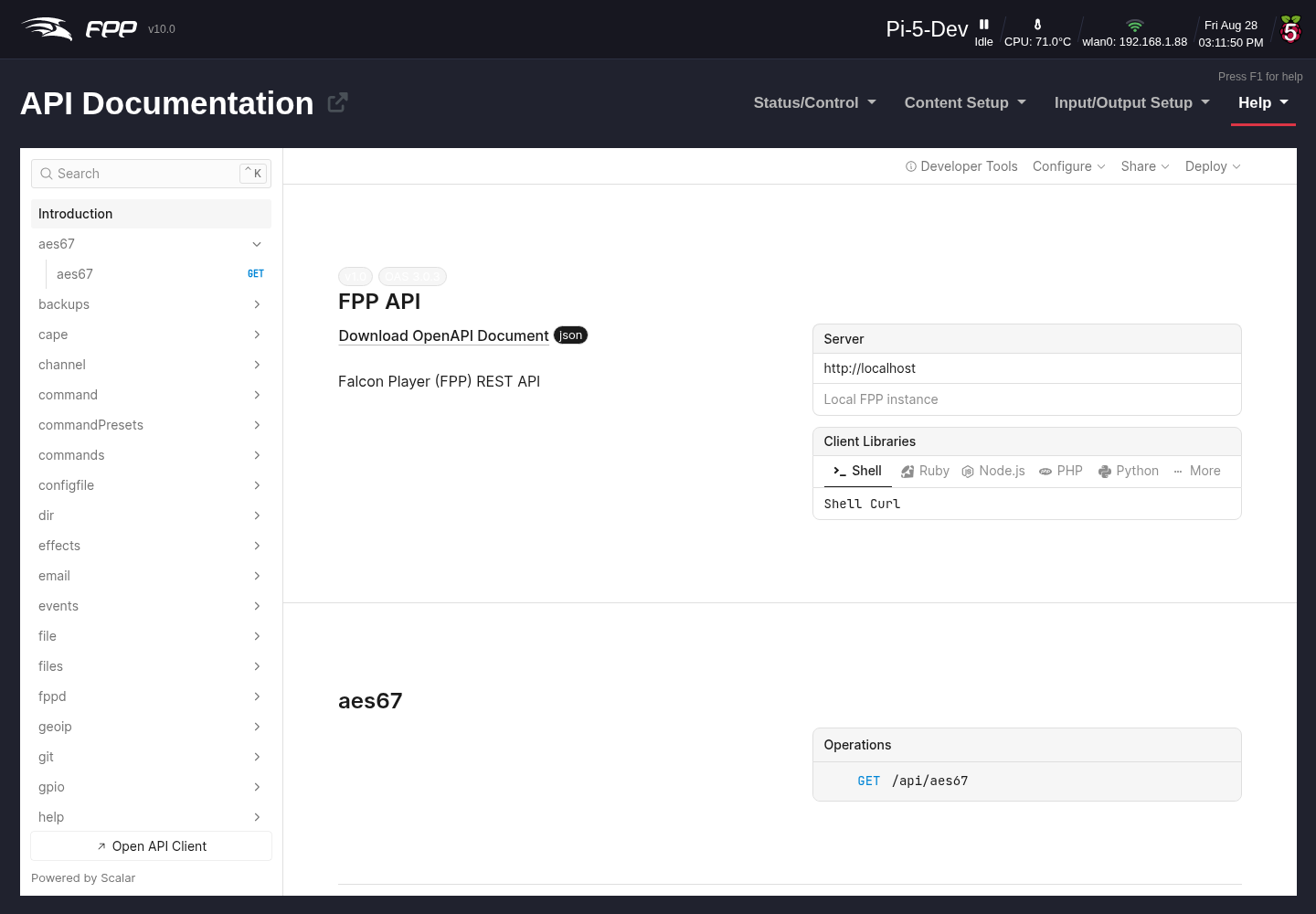
The explorer is a live, browsable reference for every endpoint on this device:
- Endpoints are grouped into sections by area — player, playlist, playlists, command, commandPresets, channel, models, overlays, media, files, network, pipewire, gpio, backups, plugin, and more.
- Selecting an endpoint shows its HTTP method and path, its parameters, and the request and response schemas with example values.
- A built‑in client lets you send a request to the device and see the response inline — a quick way to discover exactly what a call returns before you wire it into a script.
Note
The FPP API has no authentication. Requests you send from the
explorer (or anywhere else) act on the device immediately, so take care with
POST/PUT/DELETE calls — especially against a player that is running a
live show.
Tip
The raw specification is served at
http://<fpp-host>/api/openapi.json (OpenAPI 3.0.3). You can import that URL
into tools such as Postman or Insomnia, or feed it to a client‑code generator.
Endpoints added by installed plugins are merged into the live spec
automatically, under /plugin/<name>/.
MQTT
When configured (FPP Settings → MQTT), FPP connects to an MQTT broker and both publishes status and subscribes to command topics under a configurable prefix, making it easy to integrate with home‑automation platforms such as Home Assistant or Node‑RED. See the FPP MQTT documentation for the full topic list.
Further resources
- FPP GitHub:
https://github.com/FalconChristmas/fpp - FPP releases/downloads:
https://github.com/FalconChristmas/fpp/releases - xLights (sequencing):
https://xlights.org - Community support: the FPP/xLights forums and Facebook groups.