Display Testing
The Display Testing page tests your channel outputs and lets you quickly test stored sequences without defining playlists — a very useful troubleshooting tool. Open Status/Control → Display Testing.
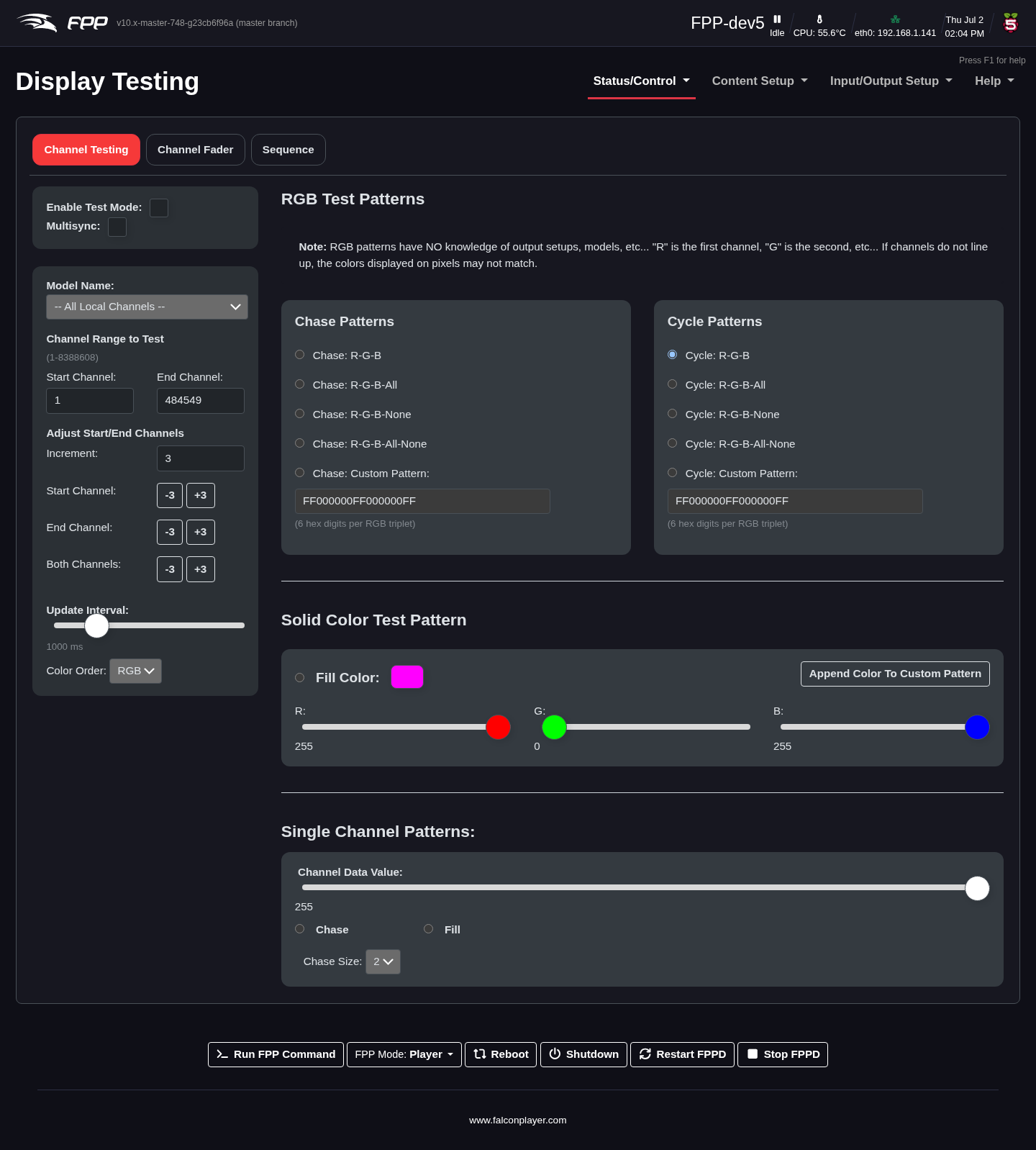
Channel Testing
- Enable Test mode – tick to start the test pattern. Deselect it when you are done, or you will get unexpected results.
- MultiSync – also send the test pattern to other FPP devices set to remote mode.
- Model Name – if you have Pixel Overlay models, select one to test; the channel range updates to that model's channels.
- Channel Range to Test – the range to test; by default FPP loads this device's configured channels. The Channel Up/Down buttons add or subtract one pixel (3 channels) from the start or end (or by a set increment) — handy for finding the start or end of a string.
- Adjust Start/End Channels – quickly change the range by the Increment value, to locate the start/end of a string or a spot in a model.
- Update Interval – how quickly the pattern changes.
RGB Test Patterns
The RGB test pattern tests lights using specified colours; the colour order can be changed to match the lights being tested.
Note
RGB Chase patterns do not take output settings into account, so colours may not display as true Red/Green/Blue — use a Cycle pattern instead in that case.
Chase Patterns light the string in a repeating colour pattern that then shifts along the string:
- Chase R‑G‑B – every 3 lights red, green, blue.
- Chase R‑G‑B‑All – every 4 lights red, green, blue, white.
- Chase R‑G‑B‑None – every 4 lights red, green, blue, off.
- Chase R‑G‑B‑All‑None – every 5 lights red, green, blue, white, off.
- Chase Custom Pattern – up to 9 colours in standard 6‑digit hex RGB notation (RRGGBB, each pair 00–FF).
Cycle Patterns light the whole string one colour, then cycle to the next:
- Cycle R‑G‑B, R‑G‑B‑All, R‑G‑B‑None, R‑G‑B‑All‑None, and Cycle Custom Pattern (up to 9 hex colours), analogous to the chase patterns above.
Solid Color Test Pattern
- Fill Color – illuminate the whole string with the colour set on the sliders (or click the colour box to use a colour picker).
- Append Color to Custom Pattern – add the selected colour to the Chase: Custom Pattern box.
Single Channel Patterns
Tests a prop by channel value, where the Channel Data Value is the intensity. The fill option sends the test value to all configured channels. Selecting a Chase Size sends a packet of that size with the first channel at the test value and the rest at 0, then repeats.
Sequence
The Sequence tab tests a stored sequence.
Note
Only the sequence data is output on the local system — audio and video are not played. Network and channel configuration must be defined before testing, and this is only available in Player mode.